PWA Architecture: The Standards That Make It Work
Progressive Web Apps (PWAs) are not a framework or a library. They are a set of web platform capabilities - grounded in open standards - that together allow a web application to behave like a native app.
The term was coined by Alex Russell and Frances Berriman in 2015, but the underlying standards have matured significantly since then. In 2026, PWAs are a well-defined architectural target, not an aspiration.
A useful way to think about PWAs is this: they are device agnostic at the application layer, but capability dependent at the platform layer. The same PWA can run on phones, tablets, laptops, and desktops, yet advanced features such as push notifications, background sync, file system access, and install behaviour may vary by browser and operating system.
That distinction is central to good PWA architecture. A well-built PWA should adapt to the device it runs on without depending on any one device class. It should use feature detection rather than device detection, and it should treat responsiveness, input flexibility, and graceful degradation as core requirements rather than optional polish.
This article covers what those standards are, how they fit together architecturally, and what it takes to build a PWA that is actually reliable across devices.
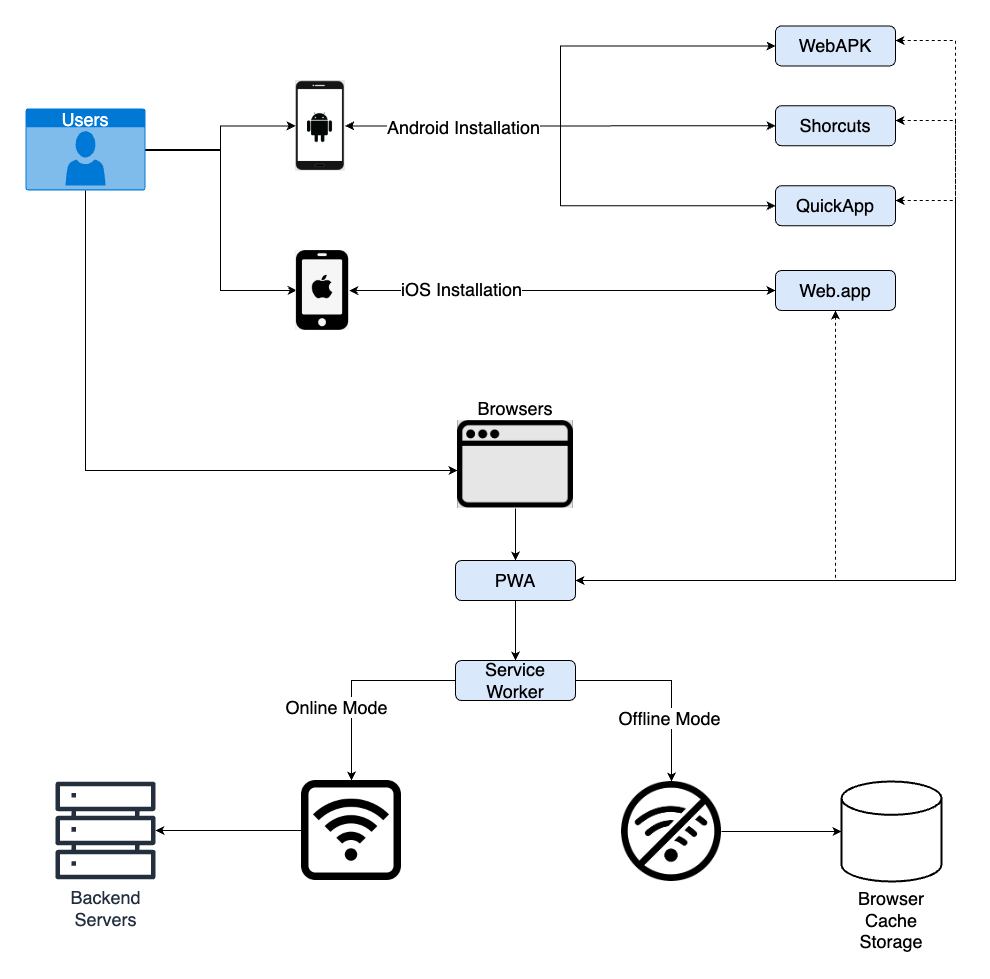
What Makes Something a PWA
There is no single binary test that certifies a PWA. Instead, there is a combination of criteria that a well-built PWA meets:
- Installable - the app can be added to the home screen or desktop, launching in a standalone window without browser chrome.
- Reliable - the app loads and behaves correctly even under poor or no network conditions.
- Capable - the app integrates with platform features such as push notifications, background sync, and file system access.
- Secure - the app is served exclusively over HTTPS.
- Responsive - the app adapts to different screen sizes, orientations, and input methods.
- Progressively enhanced - the base experience works everywhere, while richer capabilities appear only when the browser supports them.
Meeting all of these properties requires specific architectural choices, not just technical polish.
Device Agnostic, But Not Capability Agnostic
PWAs are often described as device agnostic because the core app is delivered through the browser and can run on many form factors from one codebase. But device agnostic does not mean feature identical.
A phone, a tablet, and a desktop may all load the same PWA, yet the surrounding environment changes:
- screen size and layout constraints differ
- input methods differ
- window management differs
- offline expectations differ
- notification behaviour differs
- install flows differ
- background execution rules differ
That means the architecture should focus on universal behaviours first and platform-specific enhancements second.
Good PWA design tends to follow a few principles:
- Use feature detection, not device detection. Check whether a capability exists instead of assuming it from the device type.
- Design for multiple inputs. Touch, mouse, keyboard, trackpad, and stylus should all be first-class interaction paths.
- Treat layout as fluid. The UI should adapt to narrow mobile screens and wide desktop windows without separate implementations.
- Keep the base experience consistent. Core content and navigation should remain usable even when advanced APIs are missing.
- Enhance progressively. Push, background sync, and similar features should add value where available, not become requirements for basic usability.
- Expect different performance budgets. Mobile devices often have less memory, less CPU headroom, and less stable connectivity.
- Avoid hard dependence on one windowing model. A PWA should still make sense whether it opens in a standalone window, a browser tab, or a browser-like shell.
So while the application is device agnostic in spirit, it is not device blind. The best PWAs are universal in their base experience and selective in their enhancements.
The Three Core Standards
Every PWA rests on three foundational standards. Everything else builds on top of them.
1. HTTPS
HTTPS is not optional for a PWA. The browser will not register a Service Worker on an insecure origin. This is not a coincidence - it is a deliberate security boundary.
Service Workers can intercept every network request a page makes, which means the platform only allows them to operate on origins the browser can verify as authentic.
The only exception is localhost, which browsers allow for local development.
2. The Web App Manifest
The Web App Manifest is a JSON file that tells the browser how to present the application when it is installed. It defines the app name, icons, start URL, display mode, theme colour, and other launch-time properties.
flowchart LR
    A([index.html]) -->|link rel=manifest| B([manifest.json])
    B --> C[name + icons]
    B --> D[start_url + scope]
    B --> E[display mode]
    B --> F[theme_color]

    style A fill:#1e3a5f,color:#93c5fd
    style B fill:#7c2d12,color:#fdba74
    style C fill:#14532d,color:#86efac
    style D fill:#14532d,color:#86efac
    style E fill:#14532d,color:#86efac
    style F fill:#14532d,color:#86efac
The display field controls the presentation at launch:
standalone- runs in its own window, no browser address bar.minimal-ui- minimal browser navigation controls shown.fullscreen- no browser chrome at all.browser- standard browser tab (default if the field is omitted).
The start_url field matters more than it looks.
It defines what URL opens when the user launches the installed app from their home screen or dock.
If this is wrong, the app may open on an unexpected page or fail its install criteria entirely.
The scope field defines which URLs belong to the app.
Navigating outside the scope hands the user back to the browser, which is often the right behaviour for external links but can be surprising if the scope is defined too narrowly.
3. Service Workers
The Service Worker is the most architecturally significant of the three. It is a JavaScript file that the browser registers separately from the main page thread. Once registered, it sits between the application and the network, acting as a programmable proxy.
flowchart TD
    A([Web Page]) -->|fetch request| B([Service Worker])
    B -->|cache hit| C[(Cache Storage)]
    B -->|cache miss| D([Network])
    D --> B
    B --> A

    style A fill:#1e3a5f,color:#93c5fd
    style B fill:#7c2d12,color:#fdba74
    style C fill:#3f3f46,color:#e4e4e7
    style D fill:#14532d,color:#86efac
Service Workers have a distinct lifecycle: install, activate, and fetch.
- Install fires once when the browser first encounters a new Service Worker version. This is where assets are typically precached.
- Activate fires after install, once the old Service Worker has been replaced. This is where stale caches are cleaned up.
- Fetch fires for every network request made by pages under the worker’s scope. This is where caching strategies are applied.
Service Workers do not have access to the DOM.
They run in a separate global context, communicate with pages via the postMessage API, and persist independently of any open tab.
Caching Strategies
The Service Worker fetch handler is where architecture becomes concrete. Different resources need different caching strategies, and applying the wrong one creates either stale content problems or unnecessary network dependency.
The five standard strategies are:
Cache First
The worker checks the cache first. If a match is found, it returns that response immediately without touching the network. If nothing is cached, it falls back to the network and stores the response for next time.
Best for: versioned static assets such as fonts, images, and hashed JavaScript bundles. These resources change infrequently, and serving them from cache is both faster and more reliable.
Network First
The worker tries the network first. If the network succeeds, it caches the response and returns it. If the network fails, it falls back to whatever is in the cache.
Best for: dynamic content such as API responses and user feeds, where freshness matters but offline fallback is still valuable.
Stale While Revalidate
The worker returns the cached response immediately (even if it is old) and then updates the cache by making a background network request. The user always gets a fast response, and the cache stays fresh for the next visit.
Best for: content that benefits from speed but does not need to be perfectly current - documentation pages, product listings, and similar UI.
Cache Only
The worker serves only from cache. No network request is ever made.
Best for: fully offline-first resources that are precached during the install step.
Network Only
The worker passes every request straight through to the network. No cache is involved.
Best for: analytics, payment flows, and any resource where caching would be actively harmful.
flowchart LR
    A([Fetch Request]) --> B{Strategy?}
    B -->|Static assets| C[Cache First]
    B -->|API data| D[Network First]
    B -->|Docs, listings| E[Stale While Revalidate]
    B -->|Precached shell| F[Cache Only]
    B -->|Payments, analytics| G[Network Only]

    style A fill:#1e3a5f,color:#93c5fd
    style B fill:#7c2d12,color:#fdba74
    style C fill:#14532d,color:#86efac
    style D fill:#14532d,color:#86efac
    style E fill:#14532d,color:#86efac
    style F fill:#14532d,color:#86efac
    style G fill:#14532d,color:#86efac
The App Shell Architecture
The App Shell is the most common architectural pattern for PWAs that want reliable offline-first behaviour.
The idea is to separate the application into two parts:
- Shell - the minimal HTML, CSS, and JavaScript needed to render the UI chrome. Navigation bars, loading skeletons, app scaffolding. This changes rarely and is precached during Service Worker install.
- Content - the dynamic data loaded at runtime. API responses, user data, page-specific content. This is fetched on demand and cached according to its own appropriate strategy.
flowchart TD
    A([User visits app]) --> B{Service Worker}
    B -->|Shell always cached| C([App Shell])
    C --> D([Content Request])
    D --> E{Network}
    E -->|Online| F([Fresh Content])
    E -->|Offline| G([Cached Content Fallback])

    style A fill:#1e3a5f,color:#93c5fd
    style B fill:#7c2d12,color:#fdba74
    style C fill:#14532d,color:#86efac
    style D fill:#3f3f46,color:#e4e4e7
    style F fill:#14532d,color:#86efac
    style G fill:#3f3f46,color:#e4e4e7
The benefit of this split is that the app always loads instantly. Even on a slow or disconnected network, the shell renders, and the application looks responsive while content loads.
Single-page application frameworks are well-suited to this model because the navigation logic lives in the client, and route transitions do not require full-page reloads. But the App Shell pattern is not exclusive to SPAs - server-rendered applications can also separate their shell from their content using fragment-level caching.
Background Sync and Push Notifications
Two additional standards extend what a PWA can do beyond the current browser session.
Background Sync
The Background Sync API allows the application to defer work until the user has a reliable network connection. The page registers a sync event with the Service Worker, and the browser fires that event when connectivity is available - even if the original page is already closed.
This is the right mechanism for form submissions, message queues, and any write operation that should not be silently dropped when the network is unavailable.
Push Notifications
The Push API and Notifications API work together to allow a server to send messages to the user even when the application is not open. The flow involves:
- The user grants notification permission.
- The browser creates a unique push subscription linked to the Service Worker.
- The app server sends a push message to the browser’s push service using that subscription.
- The browser push service delivers the message to the Service Worker.
- The Service Worker displays a notification.
sequenceDiagram
    participant App as Web App
    participant Browser as Browser
    participant PushService as Push Service
    participant Server as App Server

    App->>Browser: Request push subscription
    Browser-->>App: Subscription endpoint
    App->>Server: Save subscription
    Server->>PushService: Send push message
    PushService->>Browser: Deliver message
    Browser->>Browser: Wake Service Worker
    Browser-->>App: Show notification
Push notifications require explicit user permission, and the subscription is tied to the browser and device. Subscriptions expire and must be refreshed; robust implementations handle subscription rotation and remove stale subscriptions from the server.
Storage and Offline Data
Service Workers control the network layer, but persistent offline data lives elsewhere.
The two main storage options for a PWA are:
- Cache Storage - used by the Service Worker for caching HTTP responses. Optimised for URL-keyed response objects.
- IndexedDB - a full client-side database for structured data. Supports complex queries, transactions, and large datasets.
For simpler use cases, localStorage and sessionStorage remain available on the page thread, but they are synchronous and therefore unsuitable for use inside a Service Worker.
A well-designed PWA separates its offline strategy into two concerns: network response caching (Cache Storage, managed by the Service Worker) and application data persistence (IndexedDB, managed by the application layer).
The Installability Criteria
For the browser to offer an install prompt, the application must meet a set of criteria. These vary slightly by browser, but the common baseline is:
- Served over HTTPS.
- Has a registered Service Worker with a fetch handler.
- Has a Web App Manifest with
name,short_name,start_url,display(notbrowser), and at least one icon of 192×192 and one of 512×512 pixels.
When these conditions are met, the browser fires the beforeinstallprompt event on the page.
The application can catch this event, hold it, and trigger the install prompt at a contextually appropriate moment rather than immediately on page load.
Deferring the install prompt is almost always the right choice. Users who understand the value of the app are more likely to accept the install than users who are prompted the moment they arrive.
Auditing and Standards Compliance
Lighthouse is the primary tool for auditing PWA compliance. It checks installability, Service Worker registration, HTTPS, manifest validity, offline behaviour, and performance.
Scores and criteria evolve across Lighthouse versions, but the structural checks remain consistent:
- Does the app respond when offline?
- Does the start URL load when offline?
- Is the manifest valid and complete?
- Is the Service Worker registered?
- Is the content served over HTTPS?
- Are icons present at the required sizes?
A Lighthouse PWA audit is a useful baseline, but it does not replace end-to-end testing. Offline behaviour, in particular, needs to be tested across real network conditions rather than inferred from static analysis.
Architecture Summary
A production-quality PWA has a clear layered structure:
flowchart TD
    A([Browser]) --> B([HTTPS Origin])
    B --> C([Web App Manifest])
    B --> D([Service Worker])
    B --> E([Application Shell])
    D --> F[Caching Strategies]
    D --> G[Background Sync]
    D --> H[Push Handling]
    E --> I[IndexedDB]
    E --> J[Cache Storage]

    style A fill:#1e3a5f,color:#93c5fd
    style B fill:#7c2d12,color:#fdba74
    style C fill:#3f3f46,color:#e4e4e7
    style D fill:#14532d,color:#86efac
    style E fill:#14532d,color:#86efac
    style F fill:#1e3a2f,color:#86efac
    style G fill:#1e3a2f,color:#86efac
    style H fill:#1e3a2f,color:#86efac
    style I fill:#3f3f46,color:#e4e4e7
    style J fill:#3f3f46,color:#e4e4e7
Each layer has a specific responsibility:
| Layer | Responsibility |
|---|---|
| HTTPS origin | Security boundary, required for all PWA features |
| Web App Manifest | Install metadata, launch configuration |
| Service Worker | Network interception, caching, push, sync |
| App Shell | Reliable UI rendering, fast initial load |
| Cache Storage | HTTP response caching |
| IndexedDB | Structured offline application data |
What Separates a Good PWA from a Poor One
The standards define the floor. Architecture decisions determine the ceiling.
Common patterns in well-built PWAs:
- Caching strategy is explicit, not accidental. Each resource type has a deliberate strategy. There is no catch-all cache that eventually grows stale.
- The offline experience is designed, not assumed. The app shows meaningful content offline rather than a blank screen or a generic error.
- The install prompt is earned. The user is asked to install after they have experienced enough of the app to understand its value.
- The Service Worker is versioned. Cache names include version identifiers. Old caches are cleaned up during activation. Updates are handled predictably.
- Failures are communicated clearly. When the network is unavailable and no cached response exists, the app explains what happened and what the user can do.
Common patterns in poor PWAs:
- A manifest and Service Worker are added as an afterthought to pass a Lighthouse audit without rethinking the architecture.
- All resources use the same caching strategy regardless of how often they change.
- The offline fallback is a generic network error page rather than app-specific content.
- Push notification permission is requested immediately on first visit.
- Service Worker updates are not handled, so users run stale versions indefinitely.
Closing Thought
PWA is not a checklist to tick. It is an architectural commitment to reliability, offline capability, and native-quality user experience - built entirely on open web standards.
The standards themselves are stable. The architectural discipline around them is what determines whether a PWA is genuinely useful or merely technically compliant.
The distinction is visible immediately: one loads instantly and works on a train, the other shows a spinner and dies when the signal drops.